My Daily Dev Setup & Tools
My Daily Dev Setup and Tools
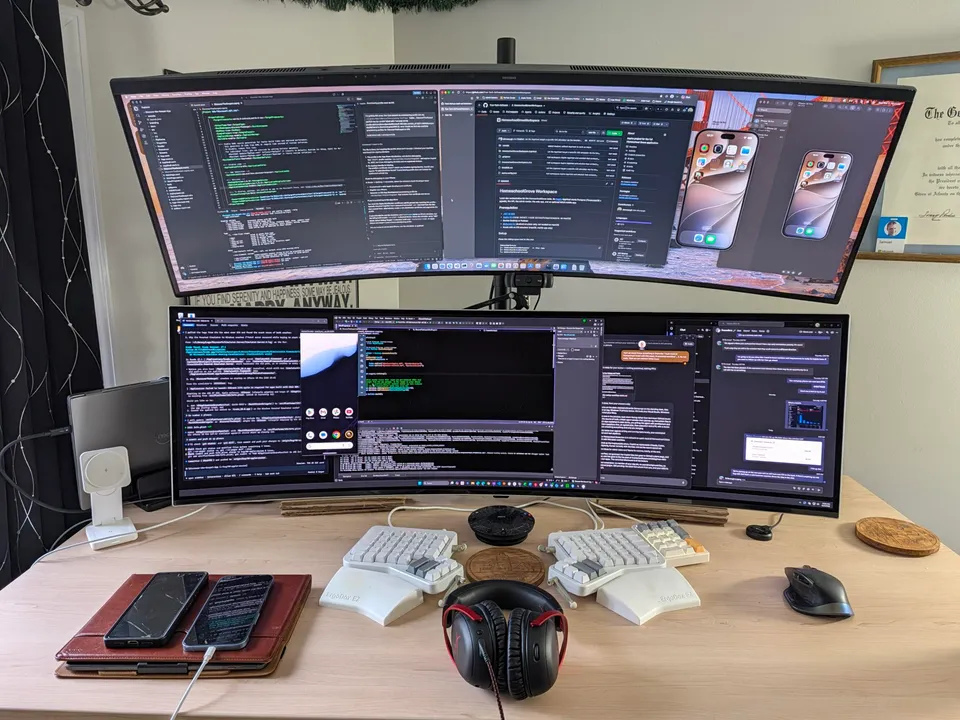
My desk tells most of the story. Two ultrawide Samsung monitors are stacked on top of each other, clamped to a standing desk. The top monitor belongs to a Mac mini; the bottom one is my primary Windows 11 development machine. I work across both all day, in a combination of VS Code and Visual Studio, with the native Windows terminal on the PC and Warp on the Mac.
But the monitors and the machines are the least interesting part. What actually makes the work fast is the process running on top of them — and it is the same process behind most of what we build at True Tech Software.
A closer look at the picture
The photo is worth explaining, because it shows the whole workflow at a glance. The top monitor runs an iOS simulator; the bottom monitor runs an Android simulator. That is not just for show — building for both platforms at once is one of my specialties, and both simulators are open while the work happens.
On the desk itself sit the physical devices: two Android devices, a tablet and a phone, plus an iPhone I use as a test device. Simulators catch most bugs; real hardware catches the rest.
Then there is the keyboard, which is more essential to the flow than it looks: a fancy split ErgoDox keyboard, plus a Logitech mouse. The keyboard was a Christmas present to myself a couple years back and has proved to be one of my favorite purchases. Typing all day puts a lot of strain on the wrists and the split keyboard + columnar layout make it feel more natural.
Look closely at the monitors and, left to right and top to bottom, you will see my entire development stack in one frame: VS Code, GitHub in the browser, the iOS simulator, Copilot in the terminal, the Android simulator, Visual Studio, Meta Muse, and then Teams. As you can see, everything is in dark mode 🕶️.
The development process
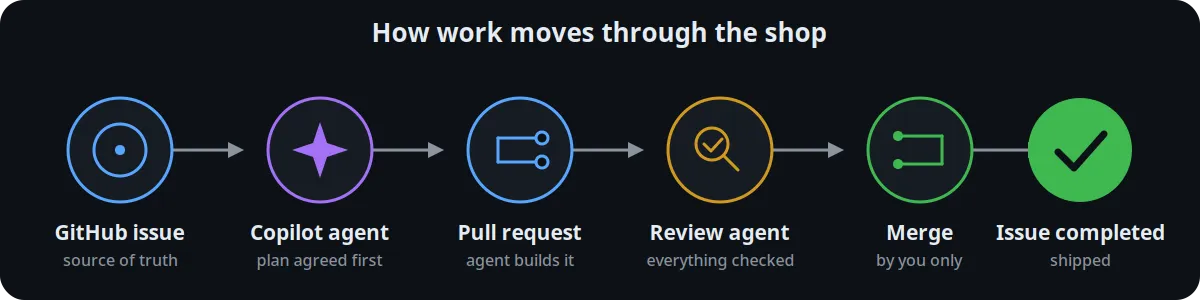
Every app feature and work item lives in a GitHub issue. That is the source of truth: if it is not in an issue, it is not work yet.
When I pick up an issue, I start a fresh agent session and have it catch up on the current state of the codebase and the issue itself. Each repository also carries a short instruction file that tells the agent how that codebase is put together and how work should be done in it, with extra notes added when a project needs them. I use the GitHub Copilot Max plan for this, but the plan is not the point — the process is.
Here is the part people usually get backwards. When I work on a software project, I do not hand the agent a task and walk away. I make it grill me first: questions about architecture, about patterns, about the mechanisms the feature will rely on. We form a plan together, we agree on it, and only then does the agent execute and build it out.
Then a second agent reviews everything, and we work through its findings before anything is committed. The agents also write and run tests during local development, and on top of that we run comprehensive automated build-and-test pipelines, so every change is checked more than once before it ever reaches a real user.
Why the agentic workflow?
Why split the work this way? Because each side is doing what it is actually best at. An agent writes code something like 20x faster than I can, and given the right context it knows software best practices better than I do — the patterns are baked into its training data and usually don’t even need to be researched. What it does not have is everything I bring to the equation: the creativity, the motivation behind the work in the first place, the judgment to decide between tradeoffs, and the long-term context. Agent sessions are short-lived, so every session starts fresh and has to be caught up; I am the one who carries the story of the product across all of them, who knows why a decision was made months ago and what it should mean for the next one. The agent supplies speed, recall, and tireless execution. I supply the human touch, the ideas, the decisions, and the continuity — and that division of labor is how I can develop software at such a rapid pace without sacrificing quality.
In fact, I built most of Homeschool Grove with this exact, AI-powered workflow.
Why this is fast
Two things make the speed possible. The first is multitasking with guardrails: agents can work on their own when they are prompted/configured correctly, so several pieces of work can move at once (I’ll often have two or three agent sessions active at a time). The guardrails are what make that safe. Agents never merge their own work - only I do.
The second is the most recent change to the setup, and it is a machine, not a model: the Mac mini. It’s plugged in to the top monitor, and it is also the build machine for the whole company, as I wrote about in The Mac Mini That Builds Our Apps. Owning the machine that builds our apps, instead of renting one by the minute, took a whole category of waiting out of the day.
Around the edges, I use Meta Muse for a lot of admin tasks, and our team communicates in Teams. Those are not the story, but they are part of how the day runs.
If you have an app idea you would like to see built this way — planned first, reviewed twice, and shipped without the usual waiting — get in touch.
Disclosure: This post includes AI-generated content